Introduction
Welcome to the Brevis ProverNet, the foundational coordination layer for the ZK ecosystem. ProverNet operates as a decentralized marketplace that bridges the gap between applications requiring zero-knowledge proofs and the specialized hardware capable of generating them.
Coordinating the ZK Ecosystem
As the demand for verifiable computation and trustless applications scales, the need for high-performance, cost-effective ZK proving capacity is growing rapidly. ProverNet addresses this by creating a unified environment where all participants (from developers to hardware providers) interact to drive the efficiency of zero-knowledge technology.
- ZK App Developers: Focus entirely on building innovative application logic without the burden of managing complex proving infrastructure. By defining computational work for the Pico zkVM, developers gain instant access to a global proving network.
- ZK App Users: Benefit from lower costs and faster response times for verifiable transactions. Real-time competition between provers ensures that efficiency gains are passed directly to users via optimized proof fees.
- Provers: Hardware providers find a streamlined way to monetize their capacity. The network’s auction mechanism matches provers with the specific workloads that best suit their hardware optimizations.
- Stakers: Token holders provide the economic security that underpins every proof. By delegating BREV to reputable provers, stakers help ensure a high quality of service while participating in the growth of the proving economy.
The BREV Utility
The BREV token serves as the core of the ProverNet economy, aligning incentives and facilitating value exchange across the network:
- Payment Medium: BREV is the native settlement currency for all proving services.
- Economic Security: Provers and delegators stake BREV to guarantee network reliability. This collateral ensures that prover nodes remain committed to delivering valid proofs within requested deadlines.
- Reward Distribution: Staked BREV qualifies participants to receive a share of the network’s generated proof fees and rewards, incentivizing long-term support and high-quality service.
- Network Governance: BREV holders govern critical protocol parameters, such as marketplace fee structures and minimum security requirements.
System Overview
The Brevis Prover Network (ProverNet) is a decentralized infrastructure that enables smart contracts to offload complex, data-heavy computations to an off-chain network without sacrificing security.
By utilizing Zero-Knowledge (ZK) proofs, the network allows a smart contract to verify that a piece of off-chain work was performed correctly. This architecture allows the blockchain to act as an enforcement and settlement layer for expensive computations such as analyzing historical states or complex data transitions, which would otherwise be prohibitively expensive to perform on-chain.
The Network Architecture
The network functions through a continuous, trustless loop between on-chain enforcement and off-chain execution. The off-chain provers perform the heavy computation, while the on-chain contracts ensure that the rules of the protocol are followed and that only mathematically correct results are accepted.
1. On-Chain Enforcement (The Rules & Verdict)
The smart contract suite serves as the final source of truth for the network’s state and rules:
- Economic Alignment & Accountability: The
StakingControllermanages prover identity and ensures every participant is a committed stakeholder with “skin in the game”. This framework aligns prover incentives by enabling them to earn rewards and yields proportional to their stake and performance. - The Marketplace: The
BrevisMarketacts as a trustless escrow and auction house, defining how work is assigned and payments are distributed to ensure a fair and competitive environment for all participants. - Cryptographic Verification: The
PicoVerifier(Brevis zkVM) provides the final cryptographic verdict. It programmatically enforces that any result submitted by a prover matches the requested computation before any rewards are released, guaranteeing the integrity of the work performed.
2. Off-Chain Execution (The Work)
The off-chain Prover Nodes are the active participants that power the network:
- Market Monitoring: Provers continuously monitor the
BrevisMarketfor newProofRequeststhat match their hardware capabilities and risk profile. - Competitive Bidding: Prover nodes run automated logic to participate in reverse auctions, bidding the most competitive fees based on local operational costs.
- ZK Proof Generation: Once a prover wins an auction, they execute the requested computation and generate a ZK proof using optimized zkVM software and high-performance hardware.
- Proof Submission: The completed proof is submitted to the blockchain to trigger the on-chain verification and settlement process.
Core Network Roles
- Requesters: Smart contracts or users that need trustless, verifiable computation.
- Provers: Off-chain operators running Brevis node software and high-performance ZK-generation hardware.
- Stakers: BREV token holders who provide economic security (collateral) for provers in exchange for a share of the generated fees.
Proof Lifecycle
The lifecycle of a single request follows a strict path to ensure reliability:
- Request: A user or dApp submits a
ProofRequestand escrows a maximum fee on-chain. - Auction: Off-chain provers compete in a sealed-bid reverse auction to win the task at the most competitive price.
- Work: The assigned prover generates the ZK proof off-chain using the optimized Brevis zkVM.
- Verification: The proof is submitted to the blockchain and verified by the
PicoVerifier. - Settlement: Upon successful verification, the fee is automatically distributed to the prover and their stakers.
Staking & Economic Security
The Staking & Economic Security layer is the foundation for the network’s operational reliability and incentive alignment. While zero-knowledge proofs provide the mathematical guarantee of correctness, this layer creates the economic framework that ensures the prover marketplace remains active, responsive, and highly available.
The Role of Capital in the Protocol
Staking in Brevis ProverNet is designed to align the interests of all participants. By requiring provers to maintain a stake, the protocol ensures that every actor is a committed stakeholder with a long-term interest in the network’s health and reputation.
- Operational Reliability: Staking ensures that provers meet a high standard of performance, fostering a predictable and dependable marketplace for requesters.
- Dynamic Eligibility: A prover’s capacity to bid on and win work is linked to their available stake, ensuring the network remains balanced and that every assignment is backed by sufficient collateral.
Advanced Vault Architecture
To ensure maximum safety and efficiency, the network utilizes an Isolated Vault Architecture based on the ERC-4626 standard.
- Risk Containment: Every prover operates through a dedicated, isolated vault, ensuring that performance events are contained individually and protecting the broader network’s liquidity.
- DeFi Composability: By following the ERC-4626 standard, vault shares are transferable ERC-20 tokens that can be easily integrated with the broader DeFi ecosystem.
- Seamless Compounding: Rewards are added directly into the vaults, increasing the asset-to-share ratio and allowing for automated reward compounding without the need for manual claims by stakers.
Economic Opportunity
The security layer is designed to reward participation through diversified yield streams:
- Marketplace Fees: Successfully fulfilling proof requests generates fees that flow back into the staking system, increasing the value of vault shares.
- Foundation Rewards: In addition to marketplace fees, the protocol distributes Foundation-funded rewards to provers based on their ZK-verified activities and total stake (vault assets).
- Shared Success: Both provers and stakers benefit from these combined revenue streams, creating a collaborative environment for scaling decentralized ZK-computation.
Staking
The staking system provides the economic framework for prover participation. By requiring provers to lock collateral, the protocol ensures a highly active and responsive marketplace where every actor has a measurable commitment to the network’s operational success.
Prover Lifecycle
The StakingController manages the journey of an operator through a defined set of states and requirements to ensure all active participants remain economically aligned with the protocol.
Prover States
- Null: The initial state for any operator before registration or vault initialization.
- Active: The prover is fully operational and eligible to bid on and fulfill proof requests in the marketplace.
- Deactivated: A cooldown or exit state. The prover can no longer take on new work but remains in the system to fulfill or mature existing unstake requests.
- Jailed: An administrative penalty state. Jailed provers are ineligible for new work until they are reactivated by an authorized administrator.
Registration & Initialization
Operators enter the network by calling initializeProver. This function triggers two simultaneous actions:
- Vault Deployment: The deterministic deployment of a dedicated ProverVault (ERC-4626) specifically for that operator.
- Initial Deposit: An initial stake that satisfies the minimum self-stake requirement, moving the operator directly from the Null state to the Active state.
Self-Stake Requirement
To maintain an Active status, provers must adhere to strict collateral rules:
- Mandatory Collateral: Provers must maintain a specific amount of their own assets (defined by
minSelfStake) within their vault at all times. - Non-Transferable Shares: The portion of vault shares representing the minimum self-stake is locked and cannot be transferred while the prover is active.
- Automatic Enforcement: If a prover’s self-stake falls below the required threshold, the system transitions them to the Deactivated state to ensure all active work is properly collateralized.
The Staking Process
Asset management within the network is handled through isolated vaults, with a streamlined process for both provers and their stakers.
- Direct Staking: Users can stake with any active prover by depositing BREV tokens into the
StakingController. The controller manages the deposit into the isolated vault and issues vault shares to the user. - Compounding Yield: Rewards from the marketplace or foundation are added directly to the vault assets. This increases the value of all shares automatically, allowing for seamless compounding without manual claims.
Two-Phase Unstaking Process
To ensure provers cannot bypass commitments to pending work, all withdrawals follow a mandatory two-phase process:
- Phase 1: Request (
requestUnstake): A user initiates an unstake by specifying the number of vault shares to redeem. The shares are burned, and the equivalent asset value enters a mandatory Unstake Delay period. - Phase 2: Completion (
completeUnstake): After the delay period has passed, the user callscompleteUnstaketo transfer the BREV tokens from the vault directly to their wallet.
Note: Assets in the “Pending” phase remain part of the prover’s economic accountability until the second phase is completed, ensuring provers remain responsive to assignments even during their exit period.
Reward Distribution
Brevis ProverNet utilizes a decoupled architecture where the StakingController serves as the central accounting engine for rewards and commissions while remaining agnostic to the specific reward source. This flexibility allows diverse engines like the marketplace and Foundation incentive programs to seamlessly integrate with the staking system.
The Reward Mechanism
When a reward enters the StakingController from an external source, it is automatically processed through a standardized logic that balances prover compensation with staker yield.
1. Prover Commission
Every prover can define Commission Rates (in basis points) that determine the percentage of a reward they retain to cover operational and hardware costs.
The system provides granular flexibility through a tiered commission structure:
- Default Commission Rate: Provers set a global fallback rate that applies to any reward source that does not have a specific override.
- Per-Source Overrides: Provers can customize their margin for different reward sources. For example, a prover may set a higher commission for
BrevisMarkettasks to cover intensive GPU costs, while maintaining a lower rate for Foundation rewards to maximize the yield passed to their stakers and remain competitive.
2. Automated Staking Yield
The portion of the reward remaining after the prover’s commission is “donated” directly into the prover’s isolated ERC-4626 Vault.
- Share Price Appreciation: These assets increase the total value of the vault without minting new shares, causing the price per share to rise for all participants.
- Seamless Compounding: This mechanism ensures that stakers receive an automated, compounding yield on their assets without the need for manual claims or restaking actions.
Flexible Reward Sources
Because the StakingController is decoupled from the reward logic, the network can support a wide variety of incentive streams.
Proving Fees (BrevisMarket)
Requesters pay Proving Fees in BREV token to have their specific computational tasks fulfilled. When a request is completed, the BrevisMarket contract processes the payment and forwards it to the StakingController to be distributed according to the winning prover’s specific commission settings.
Foundation Rewards
To bootstrap network liquidity and support long-term growth, the protocol distributes Foundation-funded rewards through a Continuous Protocol Incentivization model.
- ZK-Verified Activities: These rewards are distributed based on ZK proofs verifying a prover’s activity. This includes metrics such as active participation in auctions and the successful fulfillment of proof requests.
- Stake-Based Allocation: Rewards also take into account a prover’s total stake (vault assets), ensuring that the distribution fairly considers the economic commitment provided to the network by the prover and their stakers.
- Transparent Distribution: By verifying activity off-chain and settling rewards on-chain, the Foundation ensures a transparent and fair distribution that rewards the most reliable participants.
The Proof Marketplace
The BrevisMarket is the decentralized coordination engine of the network. It acts as a trustless, on-chain marketplace that matches computational demand from applications with the high-performance supply of independent provers.
By facilitating open competition, the marketplace ensures that requesters receive the most competitive pricing and lowest latency, while provers are rewarded for their hardware efficiency and software optimizations.
Core Marketplace Principles
The marketplace is designed to ensure the network remains open, secure, and reliable through three fundamental properties:
- Permissionless Matching: Any application can submit a proof request, and any registered prover can bid on available work. There are no centralized gatekeepers; matching is determined purely by the protocol’s mathematical auction rules.
- Trustless Execution: The marketplace does not “trust” a prover to be honest. Instead, it relies on the
PicoVerifierto programmatically verify every proof result before any fees are released from escrow. - Economic Accountability: The marketplace is deeply integrated with the
StakingController. Provers must maintain a sufficient stake to participate, ensuring they have “skin in the game” to fulfill their assignments on time and with high integrity.
Proof Request Lifecycle
While the smart contract tracks the technical status of a request, the actual lifecycle involves both on-chain transitions and off-chain coordination.
Conceptual Stages vs. On-Chain Status
| Conceptual Stage | On-Chain Status | What is Happening? |
| Submission | Pending | The requester escrows the fee and the request is broadcast to the network. |
| Auction | Pending | Provers submit and reveal sealed bids. The request remains Pending on-chain during this phase. |
| Assigned | Pending | The auction window closes. A winner is identified and begins generating the ZK proof. |
| Fulfilled | Fulfilled | The prover submits the proof. The contract confirms it and distributes fees instantly. |
| Refunded | Refunded | If a request is not fulfilled by the deadline, the requester can trigger a refund of their fees. |
Key Marketplace Components
- Request Auction: The competitive bidding process where provers compete for jobs. It is designed to encourage provers to bid their actual costs while ensuring requesters pay a fair market rate.
- Request Fulfillment: The process of generating ZK proofs, submitting them for on-chain verification, and the subsequent automatic distribution of fees or refunds.
- Overcommit Protection: A reliability safeguard that limits how much work a prover can take on at once based on their available stake, preventing the network from becoming over-leveraged.
- Submitter Management: The operational framework that allows provers to authorize specific node addresses to submit work, separating high-security staking keys from day-to-day operational keys.
Request Auction
The Request Auction represents the first half of the proof lifecycle. It is the phase where computational demand meets supply, transforming a user’s ProofRequest into a formal assignment for a specific prover. This process is governed by the BrevisMarket contract to ensure that every job is matched with a capable and economically committed operator.
The Proof Request
A ProofRequest is a set of cryptographic and economic constraints that define how the proof must be generated. When a requester submits a job, they specify the following parameters:
- Max Fee: The maximum amount (in BREV tokens) the requester is willing to pay. This amount is escrowed on-chain upon submission.
- Deadline: The strict time limit by which the proof must be submitted to the on-chain verifier.
- Minimum Stake: The minimum collateral a prover must hold in their vault to be eligible to bid. This ensures the prover has sufficient “skin in the game” relative to the task’s value.
- Proof Specification: The technical requirements for the ZK proof, including the target circuit verification key and the data to be verified.
Prover Eligibility
Not every prover can bid on every request. The marketplace automatically filters participants based on their real-time status:
- Active Status: Only provers in the
Activestate (those meeting the global Minimum Self-Stake) can participate in auctions. - Collateral Sufficiency: A prover must have enough available stake in their ProverVault to meet the request’s
minStake. The Overcommit Protection mechanism governs the extent to which a prover can take on additional concurrent workload relative to their total stake. - Reliability & Performance: To meet the deadline, provers must maintain high hardware performance and service reliability. Significant downtime or hardware lag can prevent a prover from fulfilling an assignment, putting their stake at risk.
The Bidding Mechanism
The auction uses a Commit-Reveal version of a Sealed-Bid Reverse Second-Price model. This ensures a fair and competitive environment while preventing front-running.
Phase 1: Commitment (The Bid Hash)
During the bidding window, provers submit a Bid Hash to the blockchain.
- Confidentiality: While the hash is public, the actual bid amount remains hidden. This prevents competitors from seeing and strategically undercutting bids by a few wei.
- Integrity: Once a hash is submitted, the prover cannot change their bid amount later.
Phase 2: Reveal (Price Discovery)
After the bidding window closes, the Reveal Phase begins. Bidders submit the preimage (the actual bid amount and secret) that matches their previously submitted hash.
- Tracking the Winner: The on-chain contract tracks the lowest revealed bid in real-time. Once the reveal phase ends, the winner becomes immutable on-chain.
- The Second-Price Rule: To encourage truthful bidding, the winner is paid the second-lowest bid (capped by the requester’s
maxFee). This ensures provers bid their true operational costs while receiving a fair market premium.
Assignment
Once the reveal phase is complete and the winner is finalized on-chain, the request is considered Assigned.
The winner’s required stake is now logically committed to this request. The prover then enters the execution phase to generate the ZK proof, marking the start of Request Fulfillment.
Request Fulfillment
Request Fulfillment is the final stage of the proof lifecycle. This phase transitions the proof from off-chain computation to on-chain verification, concluding with the automated settlement of fees and the handling of any service failures.
Proof Generation & Submission
Once a request is assigned, the winning prover must deliver a valid cryptographic proof before the specified deadline.
- Off-Chain Execution: The prover runs the computation and generates a ZK proof using the Brevis zkVM. Success in this phase depends on both high-performance hardware and service reliability to ensure the proof is ready within the required timeframe.
- On-Chain Submission: The prover submits the completed proof to the
BrevisMarketcontract, which calls thePicoVerifierto programmatically verify the proof’s validity. If the proof is correct, the request status is updated to Fulfilled.
Fee Distribution
When a request is successfully fulfilled, the protocol handles the distribution of the escrowed fees atomically. This ensures immediate compensation for the work performed.
The fee is distributed according to the following hierarchy:
- Protocol Fee: The
BrevisMarketcontract takes a small cut as a protocol fee, which is sent to the network treasury. - Prover Commission: From the remaining amount, the prover’s commission (based on their default or source-specific rate) is deducted and sent directly to their designated wallet.
- Staking Yield: The final portion is deposited into the operator’s ProverVault. This increases the value of the vault’s underlying assets, causing an immediate share price appreciation that compounds yield for all stakers.
Failure Handling
The marketplace provides automated logic to protect requesters and penalize unreliable behavior when a proof is not delivered.
Refund
If a request is not fulfilled, the requester can reclaim their escrowed maxFee by triggering a refund. This is available if the auction ended without any prover participation, or if the assigned prover failed to submit a verified proof before the deadline.
Slashing
Reliability is enforced through economic accountability. If an assigned prover fails to fulfill their commitment by the deadline, they may be penalized based on the minStake of the request and the configured slashBps. All slashed funds are transferred from the prover’s vault directly to the protocol treasury, ensuring that provers only bid on tasks they are capable of completing.
Overcommit Protection
The Overcommit Protection mechanism is a core reliability safeguard that balances capital efficiency with network security. It defines the maximum concurrent workload a prover can handle relative to their total stake, ensuring the network remains stable and responsive.
The Concept of Overcommitment
In a strict 1:1 collateral model, a prover would be limited to taking on tasks where the total minStake requirements exactly match their locked assets. However, requiring 100% collateral for every concurrent task can be capital-inefficient for reliable, professional operators.
Overcommitment allows the network to scale its throughput by permitting provers to manage a larger volume of “Active” tasks than their raw stake would normally allow. This ensures that the network’s computational capacity is not artificially capped by the speed of token liquidity.
Capacity Management
The marketplace tracks the Assigned Stake of every prover. A prover’s ability to bid on a new request is determined by the following eligibility rule:
Required Stake = Request.minStake + (AssignedStake * overcommitBps / 10,000)
- Assigned Stake: The sum of the
minStakerequirements for all requests currently assigned to a prover that have not yet reached a final state (Fulfilled or Refunded). - The Overcommit Parameter (
overcommitBps): A protocol-wide variable that determines how much “weight” is given to existing assignments when calculating a prover’s required collateral for a new job. - Capacity Release: As soon as a request is completed, the associated
minStakeis removed from the prover’s Assigned Stake tally, immediately restoring their capacity to bid.
Throughput vs. Safety
The overcommitBps value is a vital lever for tuning the network’s economic health. Its value represents a direct trade-off between the total volume of proofs the network can handle and the level of collateral backing those proofs.
- Higher
overcommitBps(Safety-Focused): By increasing this value, the protocol makes existing assignments “consume” more of the prover’s stake. This leads to higher collateralization per task and reduces systemic risk if a single prover fails, but it requires more total capital to maintain high network throughput. - Lower
overcommitBps(Throughput-Focused): A lower value reduces the “weight” of existing assignments, allowing a prover to take on a significantly higher volume of proofs with the same amount of total stake. This maximizes capital efficiency for provers but means a larger portion of the network’s active work is shared against the same pool of collateral.
Submitter Management
Submitter Management provides the operational security framework for provers. It allows operators to separate their high-value staking assets from the “hot” keys used for automated, high-frequency network interactions.
Operational Security
By using authorized Submitter Addresses, provers can keep their primary Staking Key in cold storage. This “hot-cold” architecture provides two main benefits:
- Risk Mitigation: If a worker node is compromised, the attacker only gains access to an operational key. They cannot withdraw or steal the underlying stake held in the ProverVault.
- Infrastructure Scaling: A single prover entity can authorize multiple worker nodes across different regions to submit proofs, enhancing redundancy without exposing their primary identity.
Submitter Registration
To ensure a secure link between an operator and their worker nodes, the BrevisMarket requires a two-step handshake to register a submitter:
- Submitter Consent: The Submitter Address (the worker node) must first call
setSubmitterConsenton the marketplace contract. This signals that the address is willing to be managed by a specific prover. - Prover Registration: The Staking Key then calls
registerSubmitterto finalize the link.
This mutual agreement ensures that no address can be mistakenly or maliciously linked to a prover’s identity without consent from both parties. Once registered, the worker node is authorized to bid on auctions and submit proofs on behalf of the prover.
The Staking Key maintains the power to call unregisterSubmitter at any time to immediately revoke a worker node’s authority, allowing for rapid key rotation or infrastructure updates.
Proof Generation & Verification
This section details the internal architecture and operational workflow of a single prover’s off-chain node, exploring how the Bidder and Proving Service components interact with the Pico zkVM to generate and verify trustless proofs on-chain.
Pico: The High-Performance zkVM
The Brevis network utilizes Pico, an open-source, high-performance zero-knowledge virtual machine (zkVM). Pico serves as the execution engine for the network, providing several key technical advantages:
- Modularity: Composed of independent, interchangeable components that allow for tailored proof systems.
- Flexibility: Supports various proving backends and custom pipelines to fine-tune proof generation.
- Extensibility: Allows seamless integration of app-specific circuits and acceleration modules (coprocessors).
- Performance: Engineered for industry-leading proof generation speeds on standard hardware through optimized workflows and specialized circuits.
For detailed technical specifications and implementation guides, refer to the Official Pico Documentation.
Off-Chain Prover Architecture
A Brevis prover node consists of two specialized service layers that communicate via a private RPC interface.
1. The Proving Service
The Proving Service is the foundational execution engine. It acts as a generic Pico Prover instance that manages the raw computational resources of the node.
- RPC Interface: It exposes a private API to the Bidder for task management. This includes a
Cost Estimationinterface which returns the expected computation cost in machine cycles or returns an error if the request is invalid (unprovable). - Execution: It receives proving tasks, executes the RISC-V bytecode, and generates the final ZK proof and public values digest.
2. The Bidder
The Bidder serves as the operational manager, handling the economic and marketplace logic. Its workflow follows a strict sequence:
- Monitor: It constantly scans the
BrevisMarketcontract for new proof requests that align with the prover’s stake and eligibility. - Dry Run: Before bidding, the Bidder performs a “dry run” by calling the Proving Service’s Cost Estimation interface. This confirms the request is technically valid and provides the cycle count needed to decide if/how to participate in the bid.
- Task Management & Submission: Once an auction is won, the Bidder sends the official proving task to the Proving Service, queries the status until the proof is generated, and subsequently facilitates the on-chain submission.
Verification Workflow
The transition from a generated proof to a fulfilled on-chain request happens through a specific sequence of contract calls.
1. On-Chain Submission
The Bidder calls the submitProof function on the BrevisMarket contract:
// BrevisMarket.sol
function submitProof(bytes32 reqid, uint256[8] calldata proof)
2. Pico Verification
The BrevisMarket acts as the orchestrator. It internally routes the proof to the PicoVerifier contract to ensure mathematical integrity:
// PicoVerifier.sol
function verifyPicoProof(bytes32 riscvVkey, bytes32 publicValues, uint256[8] calldata proof)
If the PicoVerifier confirms the proof is valid, the BrevisMarket updates the status to Fulfilled, triggering the instant distribution of fees.
Operate a Prover Node
Operating a Brevis prover node is a high-responsibility role that transforms computational power into network security. As an operator, your primary goal is to maintain a reliable environment that fulfills ZK proof requests within deadlines to earn protocol fees and staking yields.
The Operational Stack
While the architecture is detailed in the previous section, your daily operations revolve around two primary software components:
- Pico Proving Server: The core execution engine that handles RISC-V ZK proof generation.
- Bidder Server: The orchestrator that manages marketplace participation, bidding strategy, and on-chain submissions.
Setup & Management Lifecycle
Becoming an active prover involves a streamlined path from infrastructure setup to active participation:
- Hardware & Environment: Provisioning high-performance hardware and stable network connectivity to ensure proofs are generated and submitted within the required timeframe.
- Software Deployment: First deploy the Proving Server to establish your computational baseline, followed by the Bidder Server to connect that power to the
BrevisMarket. - Prover Account Initialization: Setting up your prover profile via the
StakingController. We also recommend authorizing Submitter Addresses (worker keys) to handle automated on-chain actions while keeping your primary staking key safe (in cold storage).
Run the Pico Proving Server
The Pico Proving Server is the computational backend of your node, responsible for executing RISC-V bytecode and generating ZK proofs. It operates as a standalone service that receives tasks and cost-estimation requests from the Bidder Server via a private RPC interface.
Choosing Your Hardware
Your choice of hardware directly determines your node’s capability and reliability within the marketplace. Because ZK proof generation is computationally intensive, your environment must be powerful enough to meet the strict deadlines set by requesters:
- GPU Proving (Recommended): For production environments, a GPU host is strongly recommended. For many complex proof requests, a high-performance GPU is the only viable option to generate the proof within the required deadline.
- CPU Proving: A CPU host is suitable for small workloads, experimentation, or initial testing. While it allows you to verify your node’s configuration, it may not be sufficient for the high-throughput or low-latency tasks found in the live marketplace.
Next Steps
The subsections below outline the specific installation steps, system dependencies, and configuration requirements for each setup:
- Deploy GPU Prover: Optimized setup for production-grade performance.
- Deploy CPU Prover: Standard setup for testing and lightweight workloads.
Deploy GPU Prover
-
Follow multi-machine-setup.md to prepare the GPU box.
-
Install Docker and add your user to the
dockergroup:sudo groupadd docker 2>/dev/null || true && sudo usermod -aG docker $USERIf Docker reports
could not select device driver "" with capabilities: [[gpu]], install the NVIDIA Container Toolkit and restart Docker:sudo systemctl restart docker -
Download the GPU Pico proving service image from
/home/ubuntu:curl -sL -O https://pico-proofs.s3.us-west-2.amazonaws.com/prover-network/mainnet/pico_proving_service_gpu_v1_0_1.tar -
Load the image into Docker:
# If old image exists, delete it firstly docker rmi -f pico-proving-service-gpu:latest # Load the new downloaded image docker load -i pico_proving_service_gpu_v1_0_1.tar docker tag pico-proving-service-gpu:v1.0.1 pico-proving-service-gpu:latest -
Clone the repository and enter the GPU Docker folder:
# must switch to tag `v1.0.1` if you have already cloned pico-proving-service git clone --branch v1.0.1 https://github.com/brevis-network/pico-proving-service cd pico-proving-service/docker/gpu -
Copy the environment template:
cp .env.example .env- Fix
PROVER_COUNTto the number of GPUs on your machine. - The
SPLIT_THRESHOLD,CHUNK_SIZE,MEM_POOL_RESERVE_SIZEandPICO_GPU_MEMare set to default for RTX 5090. For RTX 4090, comment the settings for 5090 and enable the settings for 4090.
Leave the others unless you are sure they need to change. If you encounter a GPU memory allocation issue, try enabling
MAX_EMULATION_CYCLES. Its value is machine specific. - Fix
-
Download dependencies and bring up the containers:
# delete the old gnark files for upgrade if exist rm -rf ../gnark_downloads make download-gnark make up -
Verify the containers:
docker psYou should see
pico-proving-serviceandpico_gnark_server. The Gnark server produces the final on-chain verifiable proof. -
Review the
Makefilefor other targets (down/restart/clean). For logs, run:make logs-server make logs-gnark
Deploy CPU Prover
-
Prepare the host:
- Instance: AWS
r7i.16xlarge(64 vCPUs) or equivalent. - OS:
ubuntu-24.04-amd64-server. - Install prerequisites:
- Instance: AWS
-
Install Docker and add your user to the
dockergroup:sudo groupadd docker 2>/dev/null || true && sudo usermod -aG docker $USER -
Download the CPU image from
/home/ubuntu:curl -sL -O https://pico-proofs.s3.us-west-2.amazonaws.com/prover-network/mainnet/pico-proving-service-cpu.tar -
Load the image:
# If old image exists, delete it firstly docker rmi -f pico-proving-service-cpu:latest # Load the new downloaded image docker load -i pico-proving-service-cpu.tar -
Clone the repository and enter the CPU Docker folder:
git clone https://github.com/brevis-network/pico-proving-service cd pico-proving-service/docker/cpu -
Copy the environment template:
cp .env.example .envKeep the default values unless you have a specific reason to override them.
-
Download dependencies and start the containers:
# delete the old gnark files for upgrade if exist rm -rf ../gnark_downloads make download-gnark make up -
Check container status:
docker psYou should see
pico-proving-serviceandpico_gnark_server. The Gnark server produces the final on-chain verifiable proof. -
Review the
Makefilefor lifecycle targets (stop/restart/clean). For logs, run:make logs-server make logs-gnark
Run the Bidder Server
The Bidder Server is the operational orchestrator of your prover node. It manages the business logic and marketplace interactions required to fulfill proof requests and secure rewards.
Operational Role
The Bidder automates the proof request lifecycle by bridging your off-chain Proving Service with the on-chain BrevisMarket. It is responsible for monitoring requests, performing “dry runs” to verify provability, managing auction bids, and submitting finalized proofs for settlement.
Setup Workflow
The deployment process is divided into two phases:
- Initialize Prover Account: Establishing your on-chain identity via the StakingController, depositing stake, and authorizing Submitter Addresses to secure your assets.
- Deploy Bidder Service: A comprehensive guide to preparing your machine, installing necessary dependencies, and launching the Bidder binary to connect with your Proving Service.
Initialize Prover Account
Before your bidder server can participate in the marketplace, you must register your prover identity on-chain. ProverNet is currently deployed on Base Mainnet.
Because the BREV token is originally issued on Ethereum, you must bridge your tokens to Base to meet the self-staking requirements (currently 1000 BREV). The BREV token address on Base is 0x086F405146Ce90135750Bbec9A063a8B20A8bfFb.
Prover and Submitter Roles
To maximize security, ProverNet decouples the prover and submitter roles. This allows you to maintain your prover account (which holds your staked BREV and identity) in a secure hardware or cold wallet, while running the automated bidder service with a separate submitter hot wallet that signs and submits proofs operationally.
Register Your Prover Identity
We recommend using a hardware wallet for your prover account to ensure the security of your staked assets.
The current Staking Controller contract requires a minimum self-stake of 1000 BREV. This amount is automatically transferred and staked during the initializeProver transaction.
Option A: Direct Contract Interaction (Recommended for Hardware Wallets)
Use a block explorer (e.g., BaseScan) to interact directly with the contracts using your hardware wallet. Perform these steps with your prover account:
- Approve Staking: Visit the BREV contract and call
approve(0x9c0D..., 1000000000000000000000)(for 1000 BREV) for the StakingController. - Initialize Prover: On the StakingController, call
initializeProverwith your desired commission rate in basis points (500 bps = 5%). This call will automatically transfer the 1000 BREV minimum stake from your wallet.- Default Rate: Applied to all reward sources without a specific override.
- Per-Source Override: Use
setCommissionRate(source, rate)for specific rates (e.g., set a higher 50% or 5000 bps rate forBrevisMarketto cover GPU costs).
- Set Profile: Call
setProverProfileto publish your metadata (name, icon). - Authorize the Submitter: If your submitter is a separate account, you must link them on the BrevisMarket contract:
- As the Submitter: Call
setSubmitterConsent. - As the Prover: Call
registerSubmitterto authorize that address.
- As the Submitter: Call
Option B: Use the CLI Utility (Alternative for Hot Wallets)
If you are using a standard keystore-based hot wallet, the init-prover tool automates the registration, the 1000 BREV staking, and submitter authorization in a single workflow.
-
Build the Tool:
git clone https://github.com/brevis-network/prover-network-bidder-ops cd prover-network-bidder-ops/tools go build -
Update
config.toml:Section Field Description chain keystorePath to your prover account keystore JSON. chain passphrasePassphrase for the prover keystore. init_prover submitter_keystore(Optional) Submitter keystore if using a separate account. init_prover submitter_passphrase(Optional) Passphrase for the submitter account. init_prover prover_nameName that identifies you or your organization. init_prover prover_iconURL of the icon that represents your organization. init_prover default_commission_rate_bpsDefault commission (e.g., 500 = 5%). init_prover proof_fee_commission_rate_bps(Optional) BrevisMarket specific rate (e.g., 5000 = 50%). -
Run:
./tools init-prover --config ./config.toml
Deploy Bidder Service
Prepare EC2 machine and install dependencies
-
Launch an Ubuntu EC2 instance with appropriate security groups and a key pair.
-
Install Go (>=1.16):
sudo snap install go --classic mkdir -p "$HOME/go/bin" -
Install CockroachDB:
curl -sL https://binaries.cockroachdb.com/cockroach-v24.2.3.linux-amd64.tgz \ | sudo tar -xz --strip 1 -C /usr/local/bin cockroach-v24.2.3.linux-amd64/cockroach sudo chmod +x /usr/local/bin/cockroach -
Configure CockroachDB as a systemd service:
sudo mkdir -p /var/log/crdb sudo touch /var/log/crdb/out.log /var/log/crdb/err.log sudo tee /etc/systemd/system/crdb.service << EOF [Unit] Description=CockroachDB single node After=network-online.target [Service] WorkingDirectory=/home/ubuntu ExecStart=/usr/local/bin/cockroach start-single-node --insecure --listen-addr=localhost:26257 \ --http-addr=localhost:18080 --store=path=/home/ubuntu/db StandardOutput=append:/var/log/crdb/out.log StandardError=append:/var/log/crdb/err.log Restart=always User=ubuntu Group=ubuntu RestartSec=10 [Install] WantedBy=multi-user.target EOF sudo systemctl enable crdb.service sudo systemctl start crdb.service -
Configure Go environment variables by appending the following to
$HOME/.profile:export GOBIN=$HOME/go/bin export GOPATH=$HOME/go export PATH=$PATH:$GOBINThen reload:
source $HOME/.profile
Setup binary, db, config and accounts
-
Clone the bidder service repo from
/home/ubuntu:git clone https://github.com/brevis-network/prover-network-bidder cd prover-network-bidder git checkout main -
Initialize the CockroachDB schema:
cat $HOME/prover-network-bidder/dal/schema.sql | cockroach sql --insecure -
Build and install the bidder binary:
cd ./cmd/service go build -o bidder cp ./bidder $HOME/go/bin cd ~ -
Copy bidder configs:
git clone https://github.com/brevis-network/prover-network-ops cp -a prover-network-ops/node-configs ~/.bidder -
Edit
~/.bidder/config.toml:You may use separate accounts for staking (
prover) and for bidding/submitting proofs (submitter), or reuse the same Ethereum account for both.Field Description prover_urlPico proving service gRPC endpoint ( ${pico-ip}:${port}, default port50052)prover_eth_addrEthereum address of the prover account submitter_keystorePath to the submitter keystore JSON (or AWS KMS reference) submitter_passphraseKeystore password (or apikey:apisecfor AWS KMS)Optional tuning fields:
Field Description prover_gas_pricePrice per prove cycle (bid fee = prove_cycles * prover_gas_price / 1e12). Cycles are auto-computed; set the price based on your operational costsprove_min_durationSkip requests whose remaining time (reveal → deadline) is less than this many seconds max_input_size0means no limit; otherwise skip requests with larger inputsmax_feeSkip requests whose bid fee would exceed this ceiling vk_whitelistIf empty, accept all requests. Otherwise process only verification keys (VKs) on this list vk_blacklistSkip requests targeting VKs on this list Note: (1) Fees are denominated in the staking token. (2) A VK digest is generated when building the ELF binary and uniquely identifies a ZK program.
Run the bidder service
-
Create a systemd service:
sudo mkdir -p /var/log/bidder sudo touch /var/log/bidder/app.log sudo tee /etc/systemd/system/bidder.service << EOF [Unit] Description=bidder daemon After=network-online.target [Service] Environment=HOME=/home/ubuntu ExecStart=/home/ubuntu/go/bin/bidder --config /home/ubuntu/.bidder/config.toml StandardOutput=append:/var/log/bidder/app.log StandardError=append:/var/log/bidder/app.log Restart=always RestartSec=3 User=ubuntu Group=ubuntu LimitNOFILE=4096 [Install] WantedBy=multi-user.target EOF -
Create
/etc/logrotate.d/bidderand add the following:/var/log/bidder/*.log { compress copytruncate daily maxsize 30M rotate 30 } -
Enable and start the service:
sudo systemctl enable bidder
sudo systemctl start bidder
Use the ProverNet
The ProverNet enables decentralized ZK proof generation for custom computations via the Pico zkVM. This infrastructure separates the creation of computational logic from the actual request for proofs, allowing for a flexible ecosystem where different participants can interact with the network.
1. Write Applications
The application developer defines the computational logic in Rust, which compiles to RISC-V for execution within the Pico zkVM. This process produces a unique verification key (VK) and a program image (ELF) that serve as the identifiers for the specific work to be performed on the network.
2. Send Proof Requests
A request sender (which may be the application developer or an end-user) submits the program’s VK and public inputs to the BrevisMarket contract. By attaching a fee, the sender triggers the marketplace auction process to have the computation proved and verified on-chain.
Write Applications
To utilize the ProverNet, you must first develop your application logic and compile it for the Pico zkVM to generate its unique identifier.
1. Install Pico CLI
The Pico CLI is required to build programs and manage zkVM artifacts. Please use version v1.2.2.
Option 1: Install via Cargo
cargo +nightly-2025-08-04 install --git https://github.com/brevis-network/pico --tag v1.2.2 pico-cli
Option 2: Install from a Local Checkout
git clone https://github.com/brevis-network/pico
cd pico
git checkout v1.2.2
cd sdk/cli
cargo install --locked --force --path .
Verify the installation:
cargo pico --version
2. Build the Application (ELF Artifact)
Pico applications are compiled into a RISC-V Executable and Linkable Format (ELF) file.
- Refer to the Official Pico Documentation for application structure.
- Explore EVM Pico App Examples for pre-built templates.
To build your program into an ELF, run:
cd <app-name>
cargo pico build
cd ..
3. Generate the Verification Key (App ID)
Every program ELF has a unique, deterministic Verification Key (VK), which serves as the App ID on ProverNet. This key is static for a specific version of your code.
Use the helper tool in the evm-pico-apps repository to extract it:
VK_VERIFICATION=true cargo run -r --bin gen-app-id -- --elf <app-name>/elf/riscv32im-pico-zkvm-elf
Example (Fibonacci app):
VK_VERIFICATION=true cargo run -r --bin gen-app-id -- --elf fibonacci/elf/riscv32im-pico-zkvm-elf
Sample output:
Generated app_id: 0x00399db87f8d0d43e1795c4aebffe8cc58486e41b98371bdf667f3d29ce4476b
This app_id (the vk) along with the ELF is what you will use in your proof requests to tell the network exactly which program logic needs to be executed.
Send Proof Requests
To request a proof from the marketplace, you must submit a transaction to the BrevisMarket contract. This page details the data structure required by the contract and the tools available to submit it.
1. The ProofRequest Structure
Every proof request is defined by the ProofRequest struct. Whether you use the CLI or a custom script, these are the parameters you must provide:
struct ProofRequest {
    uint64 nonce;               // Unique ID for the request
    bytes32 vk;                 // The Verification Key (App ID)
    bytes32 publicValuesDigest; // Commitment to the program outputs
    string imgURL;              // URL to the compiled ELF artifact
    bytes inputData;            // Encoded input data (raw bytes)
    string inputURL;            // (Optional) URL to input data if payload is large
    uint32 version;             // Verifier version (default: 0)
    FeeParams fee;              // Economic parameters for the auction
}

struct FeeParams {
    uint96 maxFee;    // Max BREV to pay for the proof
    uint96 minStake;  // Minimum prover stake required to bid
    uint64 deadline;  // Unix timestamp; proof must be submitted by this time
}
2. Prepare Inputs and Public Values
Before filling the ProofRequest struct, you must generate the execution-specific data. This produces the inputData and the publicValuesDigest.
Use the example apps as a template for generating these values. For instance, using the Fibonacci app with n=100:
VK_VERIFICATION=true cargo run -r --bin gen-inputs-fibonacci -- --n 100
Sample output:
=== For Onchain ProofRequest ===
vk: 0x00399db87f8d0d43e1795c4aebffe8cc58486e41b98371bdf667f3d29ce4476b
publicValuesDigest: 0x12c6f9f81993158e5d1e480b643b0466160893ebb0531e8c3ad7dd22c3fdeaa3
inputData: 0x01000000000000000400000000000000640000000000000000000000
Note: Ensure these values are captured accurately. Any mismatch between the
inputDataandpublicValuesDigestwill cause the on-chain verification to fail.
3. Send a Proof Request
While production applications will typically implement their own programmatic request logic using the struct above, Brevis provides a CLI utility as a reference implementation and testing tool.
Using the CLI Reference Tool
-
Installation: Clone the repository and build the tool binary:
git clone https://github.com/brevis-network/prover-network-ops cd prover-network-bidder-ops/tools go build -o tools -
Configuration: Update the
[chain]section inconfig.tomlwith yourkeystorepath andpassphrase. Add your request details in the[[request]]section using the parameters derived in the previous steps. -
Execution: Run the command to submit your requests:
./tools request-proof --config ./config.toml
Sample Apps for Testing
Use these reference programs to validate your setup:
- Fibonacci: Computes the n-th Fibonacci number. A lightweight workload for quick smoke tests.
- Tendermint: Verifies consensus transitions. A medium-weight workload that exercises Merkle proofs and signature checks.
- Reth: Executes Ethereum block verification. A heavy workload representative of production proving jobs.
Brevis ProverNet Governance Framework
The governance system of Brevis ProverNet is responsible for managing protocol parameters, coordinating upgrades, and overseeing critical decisions related to the operation of the decentralized prover marketplace.
This includes, but is not limited to:
- Auction mechanism configuration (e.g. TODA parameters)
- Prover staking and slashing rules
- Network-level constraints (e.g. proof size, security thresholds)
- Protocol upgrades and contract ownership
Governance Process
At network inception, governance is coordinated by a Security Council to ensure stability, responsiveness, and safe iteration during early-stage deployment.
During this phase:
- Proposed changes are first discussed publicly in the governance forum
- Community sentiment is measured through off-chain voting (using Snapshot)
- These votes serve as advisory signals
- The Security Council conduct proposal execution
This structure enables rapid iteration while maintaining transparency and community participation.
The Security Council operates via a multisig contract (0xb7eB979f52c0b78837AE53Bc985BD5191C6e0ee7) with a predefined 3/5 signature threshold. The composition of the council is designed to include core contributors and trusted ecosystem participants.
Over time, Brevis ProverNet governance will progressively transition toward a fully onchain governance model.
Staking in ProverNet
BREV holders can stake and delegate tokens to provers on ProverNet. Delegation works similarly to proof-of-stake systems: provers with more delegated stake can take on more proving jobs, and in return they share a portion of the proving fees with their delegators.
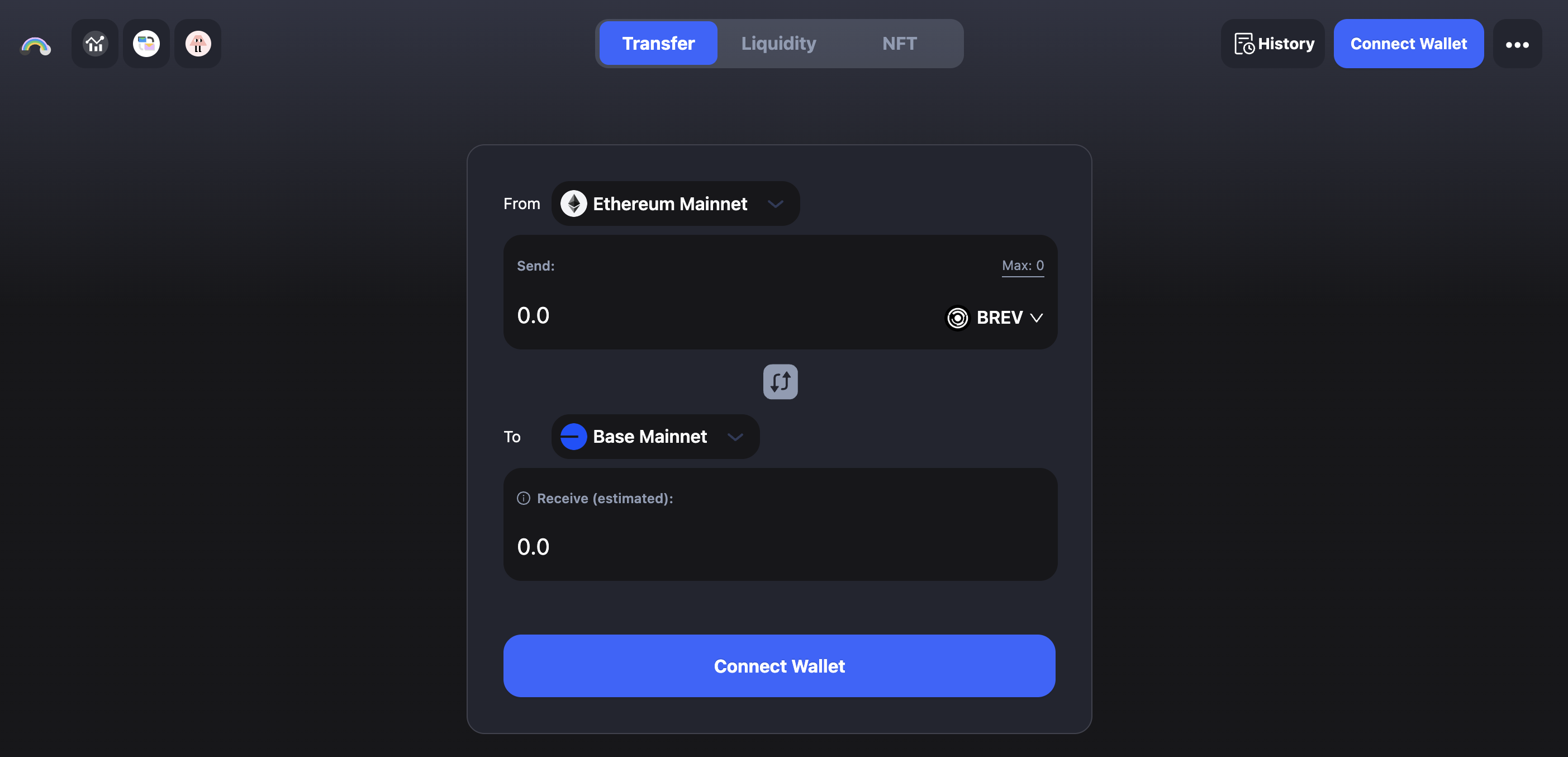
Bridge BREV to Base
ProverNet staking currently operates on Base. Before you start staking, you may need to bridge BREV to Base using cBridge.
View Active Provers
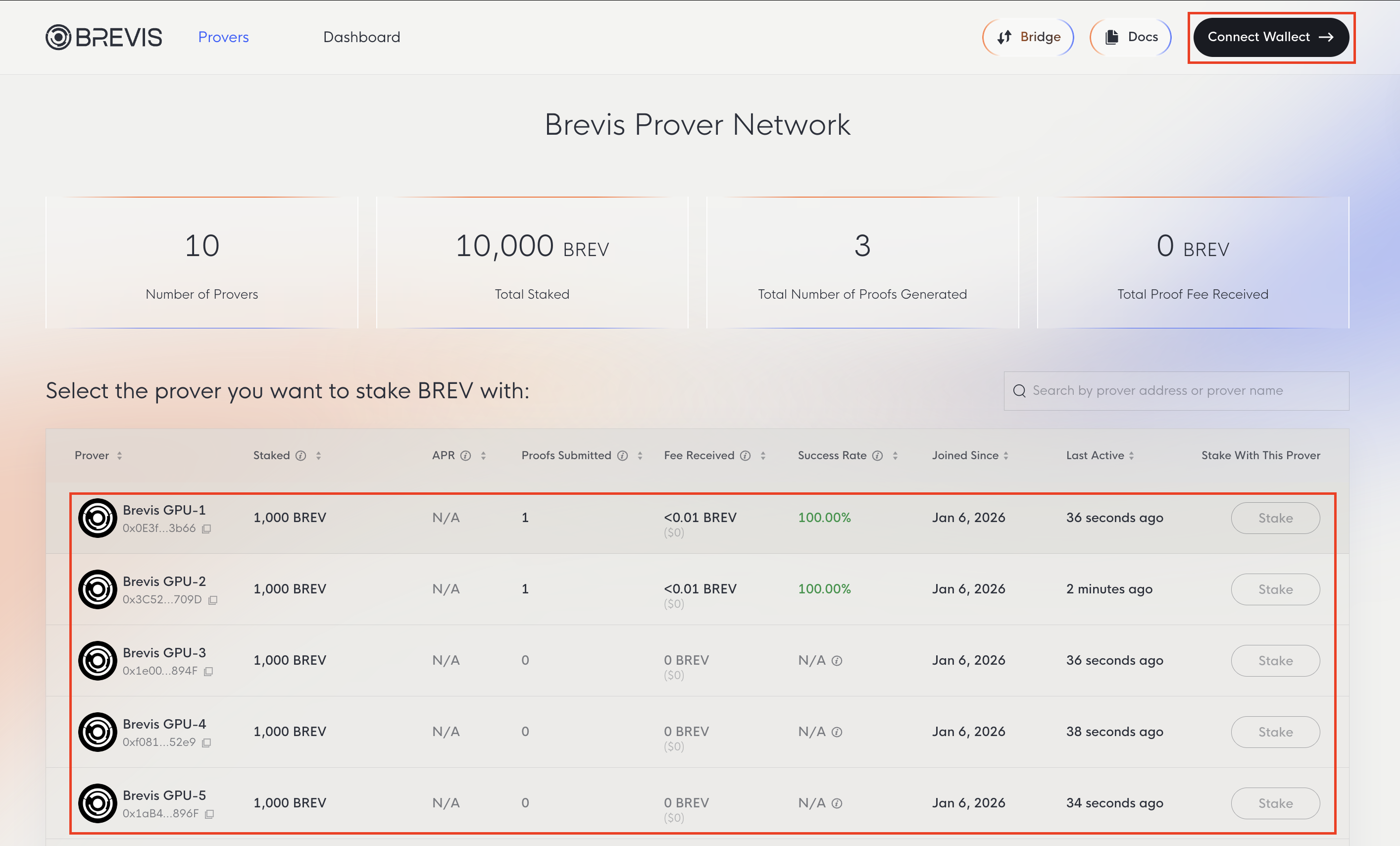
Choosing provers with a record of actively participating and consistently meeting deadlines is essential for maximizing your potential rewards. While slashing is currently disabled, a prover’s performance may impact overall staking rewards; reliable nodes ensure your delegated stake remains productive.
Visit the Brevis Prover Network to view all active provers along with key statistics including BREV staked, proofs generated, and fees earned.
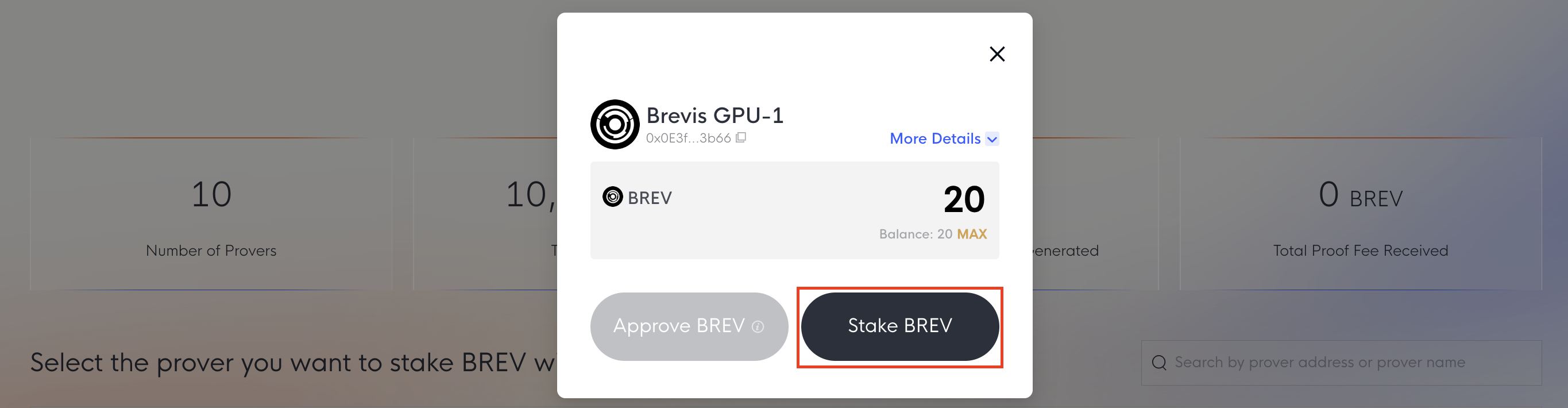
Stake BREV
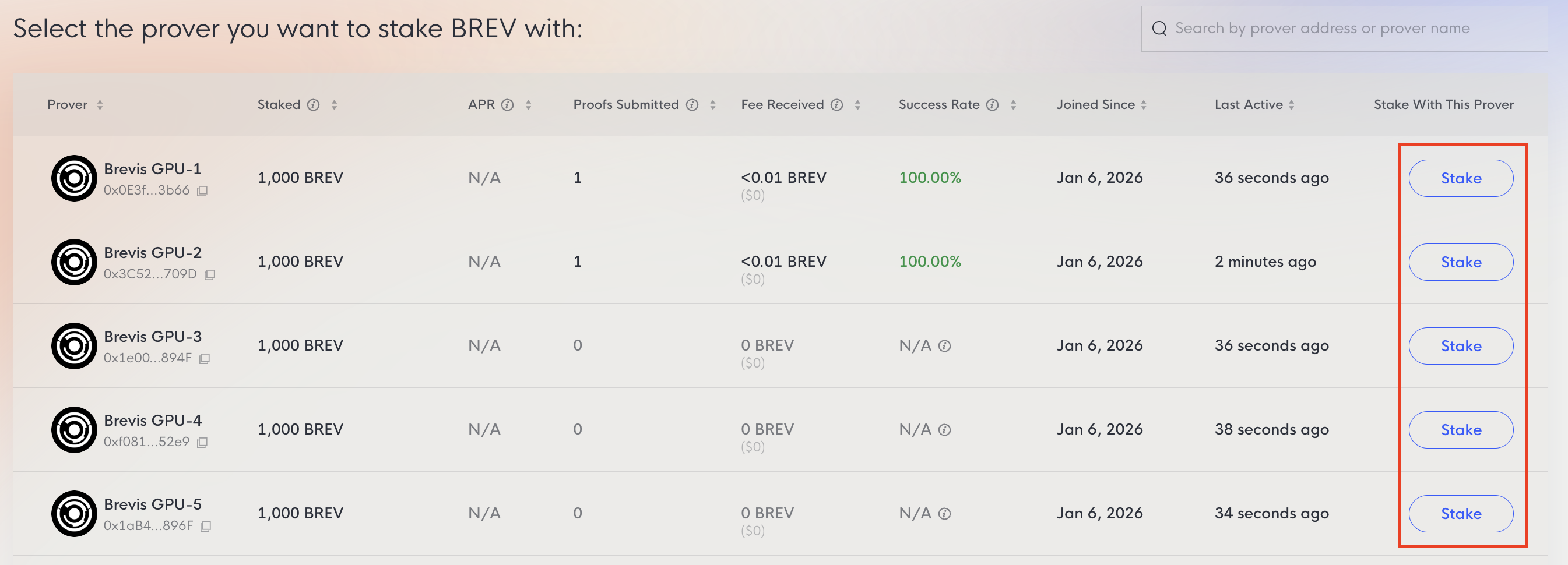
To stake, connect your wallet and select a prover.
Once connected, the Stake button will be enabled.
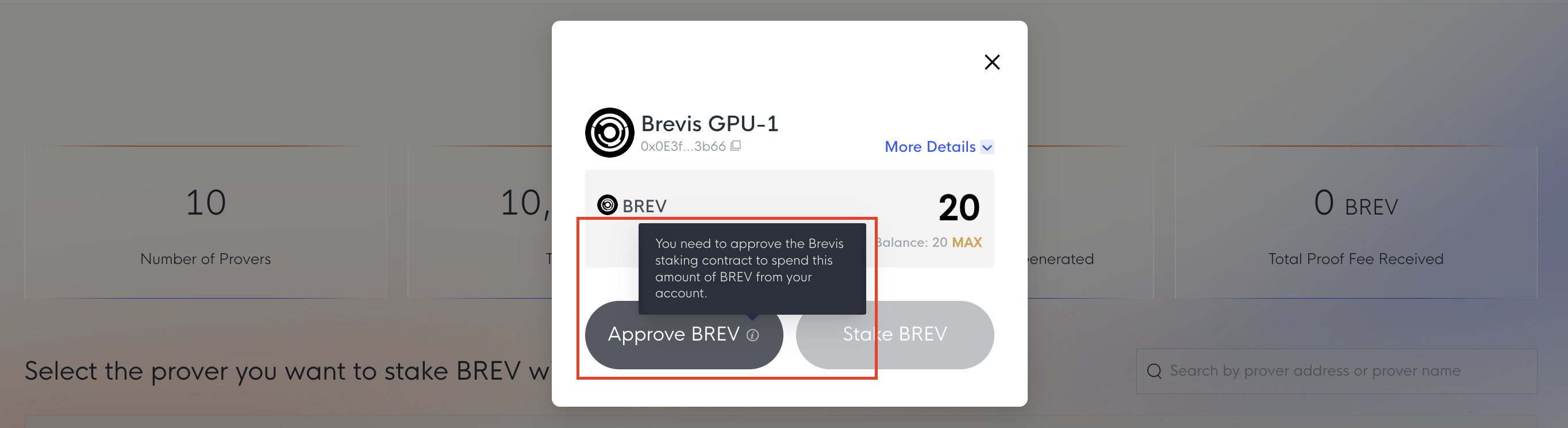
You may need to Approve the Brevis staking contract to allow the spending of BREV first. Once approved, you can submit the stake transaction.
To increase your stake with provers you’ve already delegated to, visit the Dashboard tab and use the Stake More option.
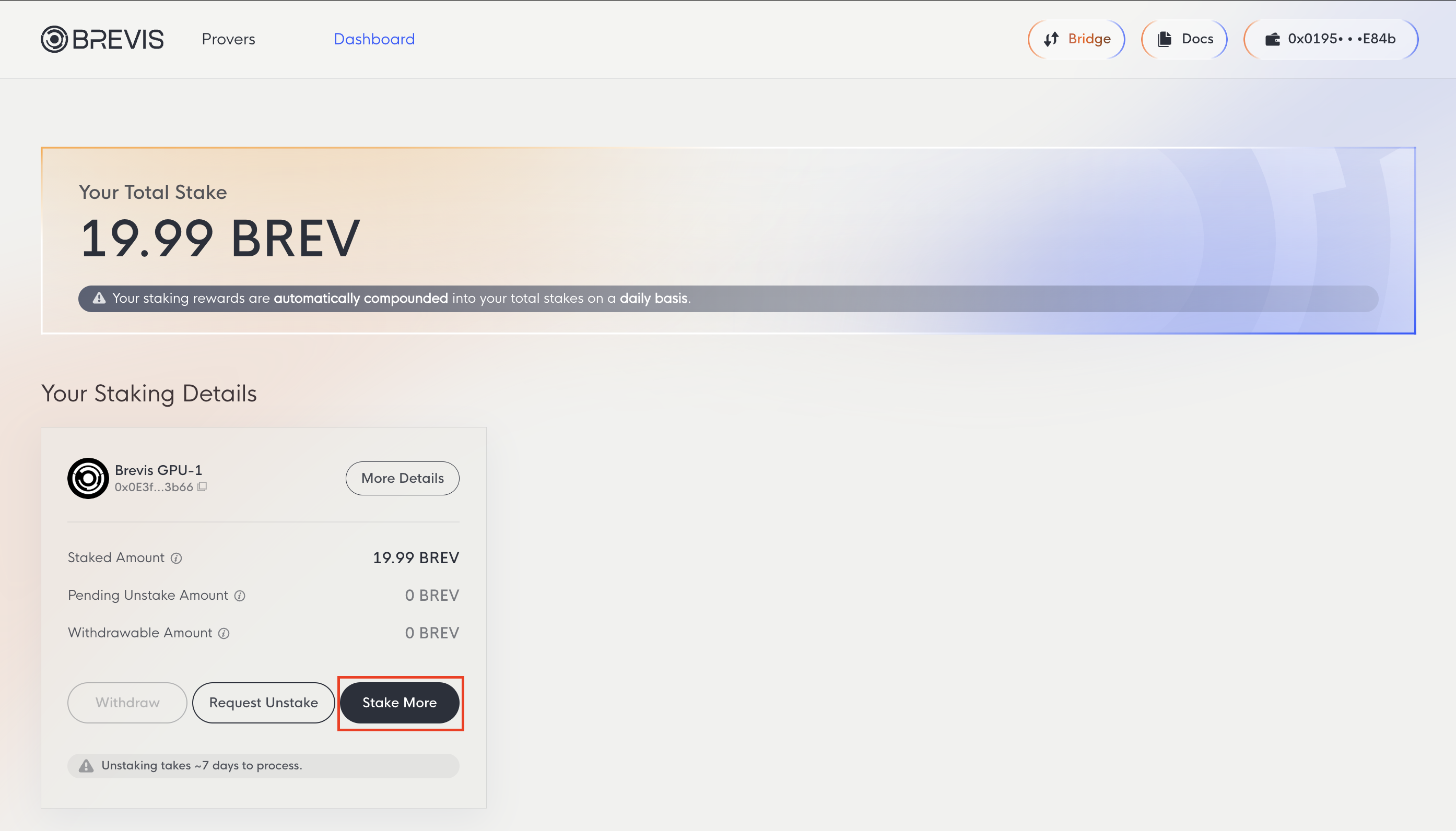
Dashboard
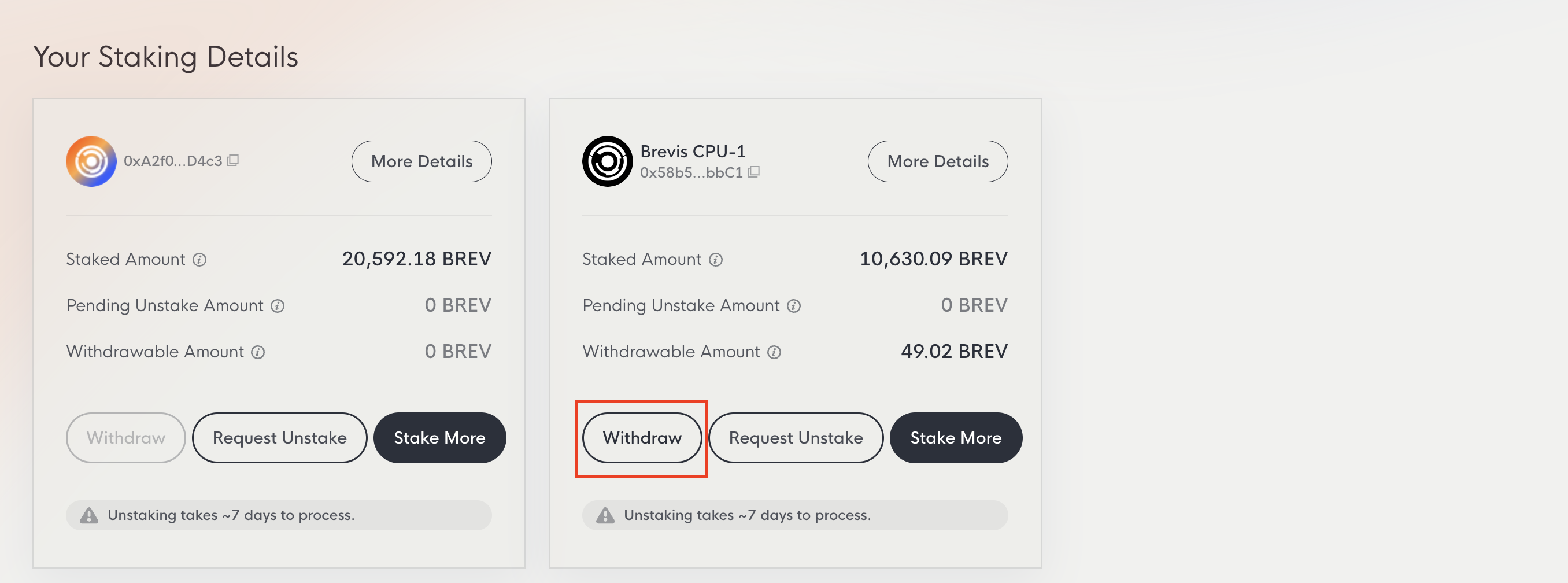
The Dashboard tab displays your total stake and detailed information for each prover, including staked amount, pending unstake amount, and withdrawable amount.
- Your Total Stake: All BREV staked across provers plus earned rewards. Rewards compound automatically on a daily basis.
- Staked Amount: BREV currently staked with a specific prover.
- Pending Unstake Amount: Amount currently in the 7-day unstaking period.
- Withdrawable Amount: Unstaked amount that has passed the 7-day period and is ready to withdraw.
Unstake BREV
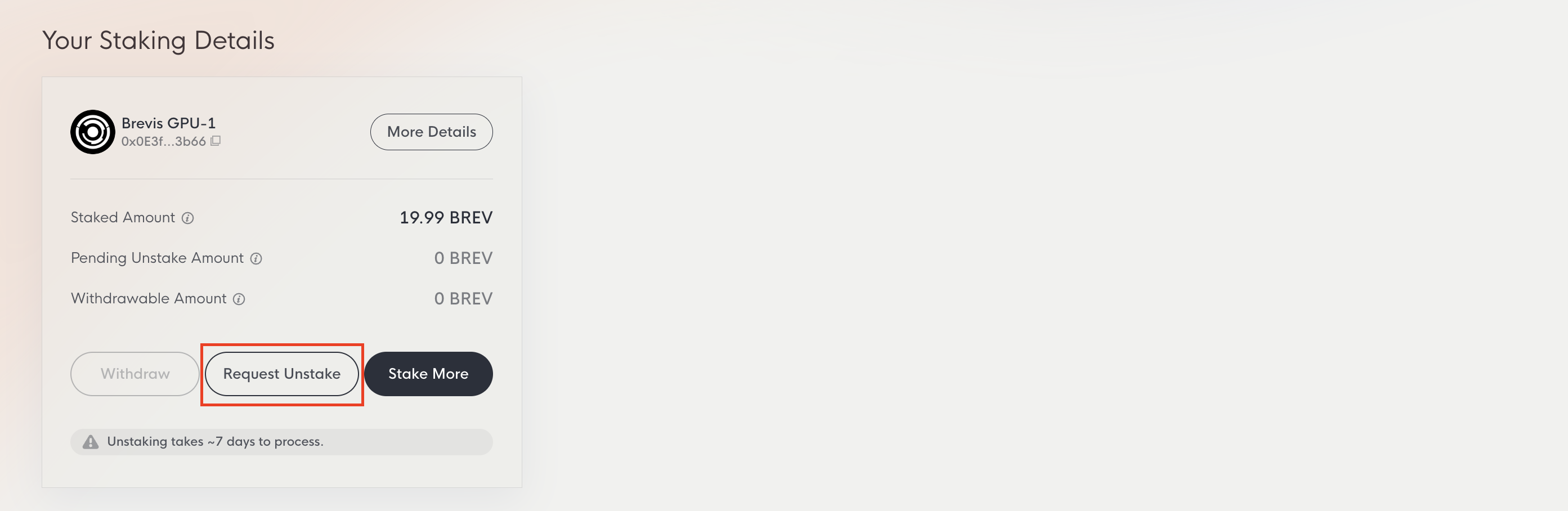
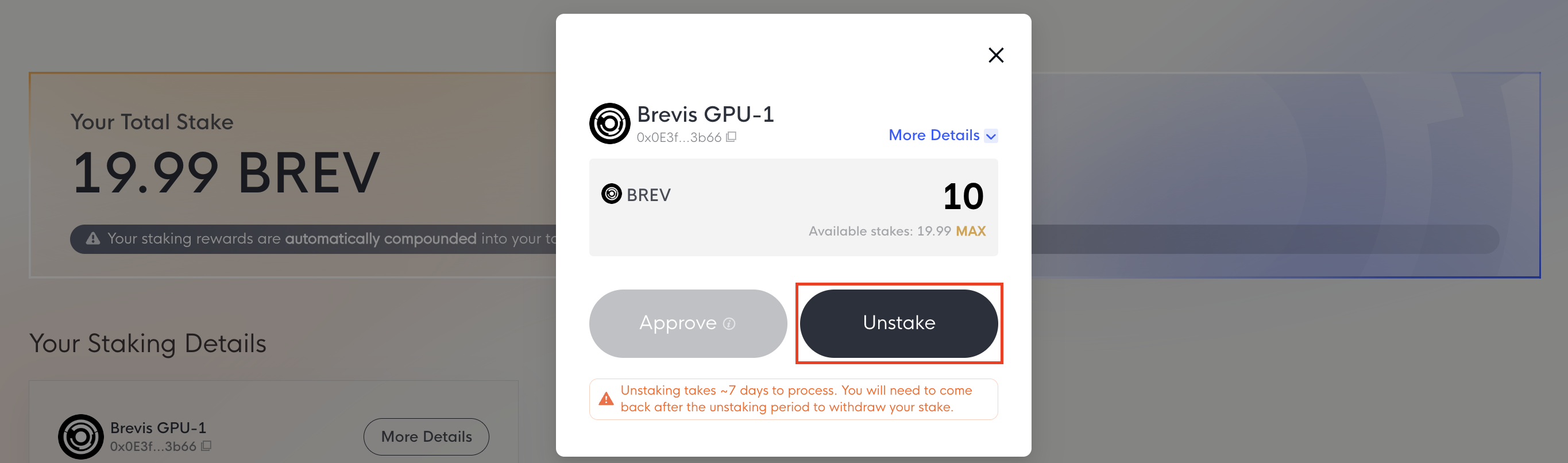
You can unstake BREV at any time by clicking the Request Unstake button on the Dashboard page.
You may need to Approve the Brevis staking contract first. Once approved, submit the unstake transaction. The unstaking period is 7 days. After the waiting period, you can withdraw your BREV.
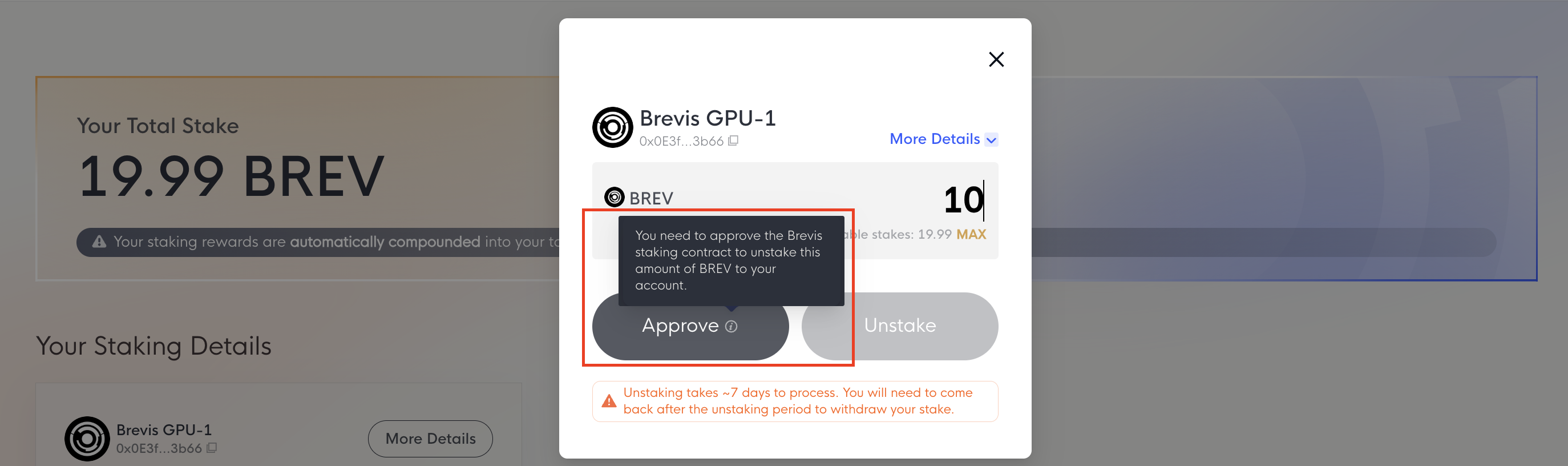
Withdraw BREV
Once the 7-day period has passed, click the Withdraw button on the Dashboard page to return your BREV to your wallet. The Withdraw button remains disabled if you have no unstaked BREV, or until the waiting period is complete.
Whitepaper
MiCAR whitepaper: https://brevis.network/whitepaper/micar.xhtml
Whitepaper: https://brevis.network/whitepaper/provernet.pdf
Contract Addresses
Brevis ProverNet currently operates on Base Mainnet. This page lists the primary contract addresses required for provers, stakers, developers, and users interacting with the network.
Base BreivsToken: 0x086F405146Ce90135750Bbec9A063a8B20A8bfFb
StakingController: 0x9c0D8C5F10f0d3A02D04556a4499964a75DBf4A3
StakingViewer: 0x659F4172BEd39DeDF6D3f02a0A8AD5719Eafe41F
BrevisMarket: 0xcCec2a9FE35b6B5F23bBF303A4e14e5895DeA127
MarketViewer: 0x0ED8C6e128D1Be1e521B6AcDC25b348829a4Ffd2